


Which SEO Issues Are Actually Holding Back Your Shopify Store?
A Shopify SEO audit should help you choose and complete the next useful fix. Start with important pages that are broken, blocked or pointing search engines at the wrong destination. Then investigate problems shared across templates, improve the information shoppers need to buy, and build qualified reach. Give each confirmed issue an owner and a clear test for completion.
A store can have hundreds of crawler warnings and only a few problems worth tackling this week. It can also have a reassuring audit score while a new collection is difficult to find or an app has changed product information. The number of warnings does not tell you where the business is constrained.
This guide is for Shopify merchants and ecommerce managers deciding what to fix themselves, hand to a developer or commission from an SEO agency. It covers a store-wide diagnosis rather than a prescription to rewrite every product description.
What Should You Fix First After a Shopify SEO Audit?
Choose priorities using business relevance, verified evidence and the scope of the cause. A warning on an obsolete product does not deserve the same attention as an accidental block on an active, commercially important collection. A template fault can affect many pages, but its actual consequences still need checking.
- Restore access to important pages. Investigate unexpected errors, redirects, noindex directives, crawl blocks or incorrect canonical targets on pages intended for search. Check the shopper journey too: a product that cannot be selected or added to the cart has an immediate usability problem.
- Repair shared faults. Look for a theme, app or data rule that creates the same issue across a meaningful page group. Test a representative sample and an unaffected control before scaling a change.
- Improve pages with a clear buying purpose. Where access works, review whether shoppers reach the right selection and can understand specifications, variants, price, stock and delivery conditions.
- Expand relevant reach. Use customer demand and competitive research to plan additional content, useful collections and earned references. Check that existing destinations can support that attention.
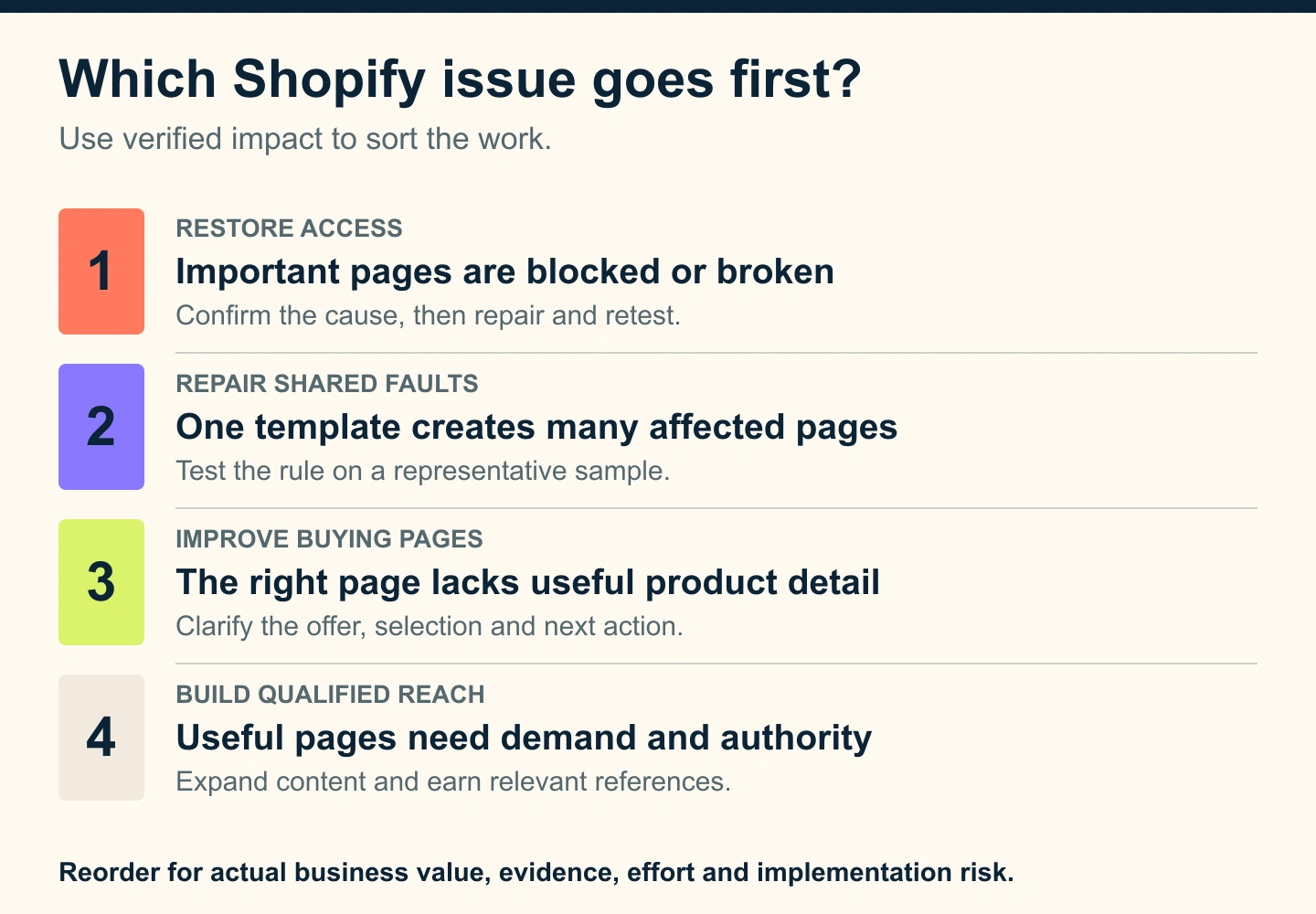
For each candidate, ask: which active products or collections are affected, what evidence supports the diagnosis, and what decision will the change improve? Record effort, dependencies and the risk of breaking a working feature. Keep an uncertain cause in investigation rather than presenting it as a confirmed fix.
Do not attach a revenue-loss figure to every warning. An affected URL count is not a count of lost customers. When a financial estimate helps, use the merchant’s own traffic, conversion and margin assumptions and explain what remains uncertain.
What Do You Need Before Conducting an Audit?
Define the business question before opening a crawler. Are important products missing from search, are collection visits declining, or are shoppers arriving without buying? Choose the relevant market, language, product groups and comparison period. Record recent theme releases, app installations, migrations, inventory changes and promotions.
Build a practical evidence set:
- Google Search Console: Review indexing information and search performance for the actual domain and priority URLs. Compare queries, pages, devices and countries rather than relying only on the site-wide average.
- Shopify Analytics and your measurement setup: Examine landing pages, shopping activity and sales by the relevant product group. Check that purchase tracking works and that consent, attribution and reporting differences are understood.
- A crawl and page inspection: Export URLs, status codes, directives, canonicals, titles, headings and links. Use rendered inspection when essential content depends on JavaScript.
- Merchant knowledge: Identify active inventory, suitable margins, seasonal demand, returns concerns and product facts that automated software cannot judge.
Tools like Screaming Frog can help inspect a catalog, while a paid SEO tool can add keyword and backlink research. Start with the question you need answered before buying another subscription. A free SEO audit tool can surface checks; it cannot establish your stock priorities, implementation dependencies or commercial fit.
Is a free Shopify SEO audit enough?
A free Shopify SEO audit is a useful first screen when its checks and limitations are clear. Ask whether it inspected one URL or the whole store, rendered the page, accessed account data and reviewed representative variants. A single-page report is not a comprehensive audit of an ecommerce website.
You can conduct much of the initial review with free SEO tools and existing account reports. Professional help becomes valuable when the task requires diagnosis, coordination or implementation your team cannot confidently deliver. Ask what the audit includes, what is excluded and whether fixes and retesting are separately scoped.
Technical SEO Audit Checklist: Can Search Engines Reach the Right Pages?
Shopify supplies useful SEO features, including automatically generated canonical tags, sitemaps and robots.txt. Its SEO overview explains those defaults. Your audit should verify the current storefront output, especially where a Shopify theme, app or custom development changes it.
Check access, indexability and the intended destination
Sample the homepage, priority collections, active products, variant URLs, guides and any important market versions. Record whether each URL loads successfully, can be crawled, carries an indexing directive and points to the intended canonical. Use the URL Inspection tool to distinguish live page behavior from Google’s last recorded state.
A page being excluded from search is not automatically an error. A duplicate version or a page intentionally kept out may be behaving correctly. The important question is whether the right buying destination is available and supported by consistent signals.
Open the generated sitemap and compare its relevant entries with your intended public catalog. Shopify’s sitemap guidance explains how to locate and submit it. Submission helps discovery; it does not guarantee indexing or a ranking.
Review custom robots rules before changing them. Crawling and indexing are different controls: blocking crawling does not reliably remove a URL from results, and it can stop a crawler reading a noindex directive. Shopify describes the distinction and the expertise needed for custom changes in its robots.txt.liquid documentation.
Audit duplicate content, variants and filters by URL type
Group examples by behavior: a clean product URL, a product reached through a collection, a variant parameter, a sort order, a filter combination and a pagination URL. Inspect what each actually serves. Do not assume that every extra URL is indexed or that every parameter should disappear.
For equivalent pages, review canonical targets, sitemap entries and internal links together. Google’s canonical guidance treats canonicalization as a set of signals, not a guaranteed instruction. If the wrong version is selected, investigate conflicting signals and page similarity before adding more tags.
Filters require a purpose decision. Most combinations exist to help shoppers refine a selection; some product subsets may justify a distinct search landing page. Google’s faceted navigation guidance distinguishes URLs that need search discovery from combinations whose crawling should be controlled. Document the intended policy with the developer rather than applying a blanket rule to all filters.
Pagination is a separate case. A second collection page can expose different products, so do not automatically canonicalize every page in a sequence to page one. Confirm that additional products are discoverable through crawlable links and review Google’s pagination recommendations. Test load-more and infinite-scroll experiences beyond their first screen.
Find broken links and check product lifecycle rules
Trace broken links from navigation, collections, buying guides and older external references. For removed products, determine whether there is a genuinely relevant replacement, useful discontinued-product information or no equivalent destination. Avoid sending every retired URL to the homepage.
A temporary stock outage needs a different decision from a permanently retired item. Let the merchant define the inventory situation before choosing a technical action. Shopify’s redirect documentation describes platform constraints, including that redirects apply to broken source URLs. Verify the response and final destination after any change.
On-Page SEO: Does the Page Help the Shopper Choose?
Once important pages are accessible, ask whether each page type matches the shopper’s intent. Keyword research should connect a broad selection query to a useful collection page and a specific product query to the appropriate item. Compare search results and customer language before assigning the destination.
Review the title, main heading and meta description together. They should describe the actual selection or offer, with distinctive product details where relevant. A title change cannot compensate for landing on an empty category, and a compelling snippet should not promise inventory the page does not carry.
On a product page, check the information a buyer needs to judge suitability: dimensions, material, compatibility, care, available options and what is included. Pair useful photographs with concise descriptive alt text. Show accurate price, availability, delivery and returns information, and test variant selection on a phone.
There is no useful universal word count for every item. Add information that resolves real uncertainty. A short but complete product explanation can be more helpful than several paragraphs of repeated supplier copy. Where many pages need the same facts, improve the underlying product data and shared presentation before commissioning manual rewrites.
Internal linking should make important products and collections reachable from relevant navigation and supporting content. A site audit can flag pages without discovered links, but confirm whether the crawl covered their actual route before calling them orphaned.
Do product data and structured data agree?
Compare visible information, structured data and the Merchant Center feed where one is used. Check representative in-stock, out-of-stock and variant states. Multiple apps or theme components may supply competing markup, so identify the source before installing another schema app.
Google’s product data guidance explains eligibility for product search features. Validate actual output against the applicable requirements. Correct markup can support eligibility; it does not guarantee a rich result, an AI recommendation or a sale. Accurate product facts remain useful across search and AI-assisted discovery.
Site Speed and Core Web Vitals: Is the Problem Shared Across a Template?
Test representative collections and products, including pages with reviews, media, recommendations and app widgets. A fast homepage does not establish that the rest of the store works well. Combine a speed audit’s diagnostic test with available real-user evidence and a hands-on mobile journey.
Shopify’s web performance reports cover loading, responsiveness and visual stability through Core Web Vitals. Use the available page URL, page type and device views to investigate patterns. Separate an individual lab test from aggregated visitor measurements; they answer different questions.
Look at large media, repeated scripts, third-party widgets and layout movement. Identify the responsible component rather than assuming every app is harmful. Review its business purpose before changing it, then test performance and functionality in an appropriate preview environment.
Page speed work needs a before-and-after record using comparable conditions. Check page load behavior, menu interaction, variant selection and add-to-cart after the release. A higher test score is useful evidence of a technical change; it does not by itself prove higher conversion or improved ranking.
Off-Page SEO: Does the Store Have Relevant Support Beyond Its Own Pages?
A backlink audit should examine relevant references, important linked destinations and broken incoming paths. Review competitors that sell comparable products to the same market, then investigate credible coverage, supplier relationships, expert buying guides or other references your business can genuinely earn.
Do not buy bulk links to resolve a technical audit warning. Likewise, a software label is not enough reason to remove or disavow every unfamiliar link. Establish a real problem and an appropriate response before taking broad action.
Local SEO belongs in the review when the business has an eligible customer-facing location or service operation. An online-only store does not need an invented local footprint. Keep the audit aligned with how customers actually discover and buy from the business.
What Does an Actionable Ecommerce SEO Audit Finding Look Like?
Consider a hypothetical home-goods store. A new collection of ceramic pitchers should be a search destination, but inspection shows its shared theme code pointing the canonical to an unrelated collection. The store’s actual diagnosis would require page and account evidence; this example shows how to write the handoff.
Finding: unintended canonical target on a priority collection
- Observed evidence: Save the affected URLs, rendered canonical, inspection date and the intended destination. Include a comparable collection that behaves correctly.
- Business relevance: The merchant confirms the collection is active, stocked and a useful destination for its target shoppers.
- Diagnosis: The developer traces the wrong target to a shared rule and confirms which pages use it.
- Action: Correct that rule in a tested theme copy, preserving intentional canonical behavior on other URL types.
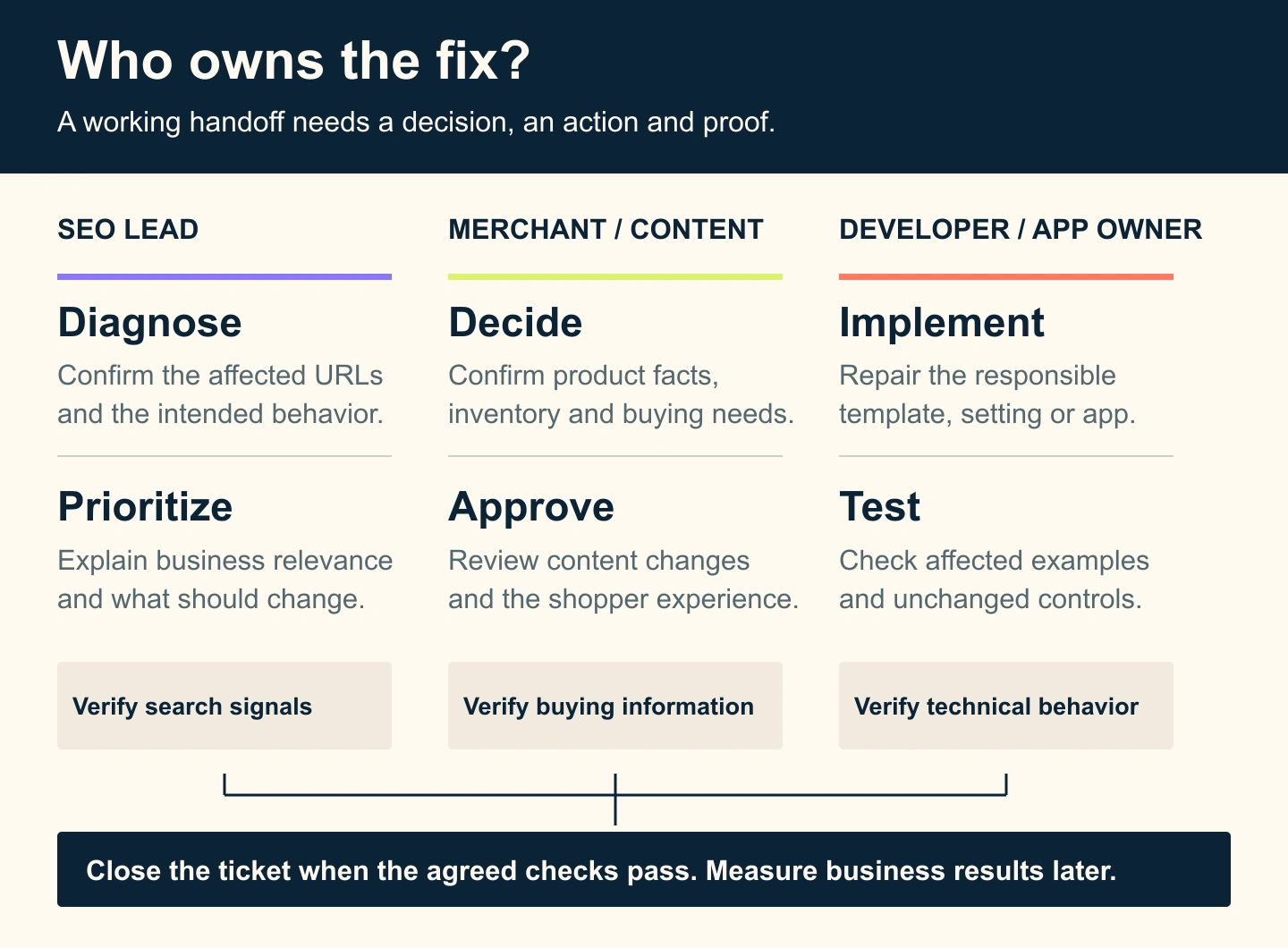
- Owner: Developer implements; SEO lead verifies search signals; merchant confirms the selection and shopping route.
- Acceptance: Intended canonical appears on the affected sample, control URLs retain their correct behavior, and navigation and product selection still work.
- Follow-up: Recheck Google’s recorded canonical and relevant search performance after recrawling. Keep that monitoring separate from whether the code change passed.
This is more useful than a ticket saying “fix duplicate pages.” It identifies the decision, the cause to investigate and the evidence needed to close the work. Do not promise that changing the tag will immediately change Google’s selection or restore a particular position.
Who Should Own the Fixes After the Website Audit?
Separate diagnosis, implementation and approval. The same person may hold more than one role, but every finding still needs an accountable owner. Ask the SEO lead to explain what the evidence supports, the merchant to confirm commercial and product facts, and the developer or app provider to implement the responsible change.
| Finding | Likely implementation owner | Evidence needed to close it |
|---|---|---|
| Incorrect product facts or incomplete buying details | Merchant or content team | Approved facts appear correctly across applicable variants |
| Unexpected canonical, directive or filter behavior | Developer or responsible app provider | Affected and control URLs follow the agreed policy |
| Slow shared page component | Developer and component owner | Comparable performance tests plus a working shopper journey |
| Useful products lack a navigation route | Merchandising and development | Relevant links appear and a crawl reaches the intended destinations |
| Unclear purchase reporting | Analytics owner | Validated events and documented reporting limitations |
Request a deliverable with affected examples, evidence, priority, proposed action, owner, dependencies and acceptance checks. An SEO services proposal should state whether it includes implementation, developer coordination and retesting, or only recommendations. These boundaries matter more than the number of exported warnings.
How do you measure SEO performance after the fixes?
Use two separate records. First, confirm that the technical or content change passed its agreed checks. Then measure what happened to relevant discovery and shopping behavior. A closed development ticket is not evidence of new revenue.
Track the priority product group through search impressions and clicks, suitable landing pages, shopping activity, orders and revenue where attribution allows. Google’s Search Console comparison guidance explains filters that help make page, query, country and device comparisons more meaningful. Use comparable periods and annotate releases, stock changes and promotions.
Organic traffic can rise for irrelevant queries, while a profitable narrow range may attract fewer visits. Review whether shoppers reach active products and whether the business outcome improves. A ranking change is one signal among several, and it should be tied to the correct page and market.
When Should You Bring in Shopify SEO Help?
Start internally when the work is straightforward, evidence is clear and a competent owner can test the change. Bring in SEO experts when problems span templates, apps, markets or migrations, when important pages have conflicting signals, or when your team has a long report without an implementation path.
The subscription tier does not determine the whole scope. A small catalog can have complex custom development; a Shopify Plus store may need wider market, integration and release coordination. Ask a prospective Shopify agency to explain how its audit sample covers your actual store and how it checks changes safely.
Audit timing should follow change and risk. Repeat focused checks after theme releases, major app changes, migrations or unexpected search declines. Review the wider plan as the catalog and business priorities change. A fixed calendar is less useful if it misses the release that altered your storefront.
TeamSoda’s ecommerce SEO services connect catalog review, technical controls, buying information and measurement. If you need help choosing the next fix, share the store, priority product groups and the evidence you already have. The useful next step is a scoped plan with owners and checks your team can act on.