



Which customer journey should you test first?
Start your website redesign SEO checklist with one page that brings in business. Open its old address, follow it to the redesigned page and complete the main customer task. Hold the launch if a priority page disappears, sends people to the wrong service or fails to deliver an inquiry.
Suppose a clinic moves a treatment page. The old link opens the right treatment, and the booking form shows a confirmation. Ask the receptionist which location received the test. If the request went to a different branch, the booking check is still open.
If you are still choosing whether to rebuild, use the repair-or-redesign guide. Once a rebuild is underway, use the table below to agree with your developer on what has to pass.
Which issues should delay the website launch?
Read each row with the person who owns the release. Agree on what would close the issue while there is still time to test it.
| Finding | Recommended decision | Evidence needed to close it |
|---|---|---|
| Priority service pages inherit a development noindex rule | Fix before launch | The developer checks the indexing directive on the affected template and an intended public page. Repeat the check on the live domain. |
| Changed important URLs lead to errors or unrelated pages | Fix before launch | The old address goes straight to the agreed replacement. The service, location and next step match the old page’s purpose. |
| Inquiry or booking fails | Fix before launch | A named recipient confirms the test arrived at the right inbox, branch or booking system. |
| Tracking cannot distinguish completed inquiries | Agree a fix or an explicit measurement gap before approval | A single test completion appears in the intended analytics property, or the owner accepts a documented gap and repair date. |
| Minor spacing or an optional new article remains unfinished | Usually schedule after launch | The owner records a follow-up date after confirming the issue leaves essential information and customer tasks usable. |
If the developer can show a broken redirect but the team has no one to map and retest the important URLs, this is a good point to get technical SEO help with the migration. Bring the old URL, its intended destination and the release date.
What Should You Audit Before the Website Redesign Starts?
Begin with what the existing site contributes to the business. Agree on the services, products and markets that matter, then connect them to the pages customers already use. If you need help prioritizing the work, see how our SEO services cover page improvements and technical fixes. Business goals might include better qualified inquiries, a clearer booking process or support for a new service. “A more modern website” is too vague to evaluate by itself.
Ask your team to keep a dated baseline that includes:
- Important landing pages: pages receiving useful search visits, inquiries, sales or relevant backlinks.
- Search performance: page and query exports showing clicks, impressions and search rankings, with the date range and filters recorded.
- Customer outcomes: completed inquiries, calls, bookings or purchases where the tracking is reliable.
- Current page details: URLs, titles, headings, indexability, canonical targets and internal links.
- Known pain points: slow templates, broken links, confusing navigation or recurring questions from customers.
Separate branded searches from discovery searches where useful. Compare sensible time periods and note seasonality, advertising changes and tracking gaps. A page with few visits can still matter if it answers a high-value buyer question. A busy page can bring little commercial value.
Use Google Search Console alongside your analytics and inquiry records. Do not treat an analytics event count as proof that every event became a qualified lead. Your sales team can help identify which landing pages support worthwhile conversations.
The outcome should be a short list of pages and customer journeys the redesign must protect, supported by an export of the wider site. That gives the designer, developer and SEO specialist a shared reference.
How Do You Map Old URLs to the New Website?
Decide the purpose and destination of each existing page before development is finished. A URL mapping sheet should record the old URL, its intended treatment, the final destination where applicable, the reason and the person checking it. Keep useful addresses when there is no clear reason to change them.
Apply three decisions:
- Keep: the useful page remains at the same address, with any approved improvements.
- Move or consolidate: an equivalent new page or a genuinely relevant combined page replaces it.
- Retire: the content has no appropriate replacement and the team has approved its removal.
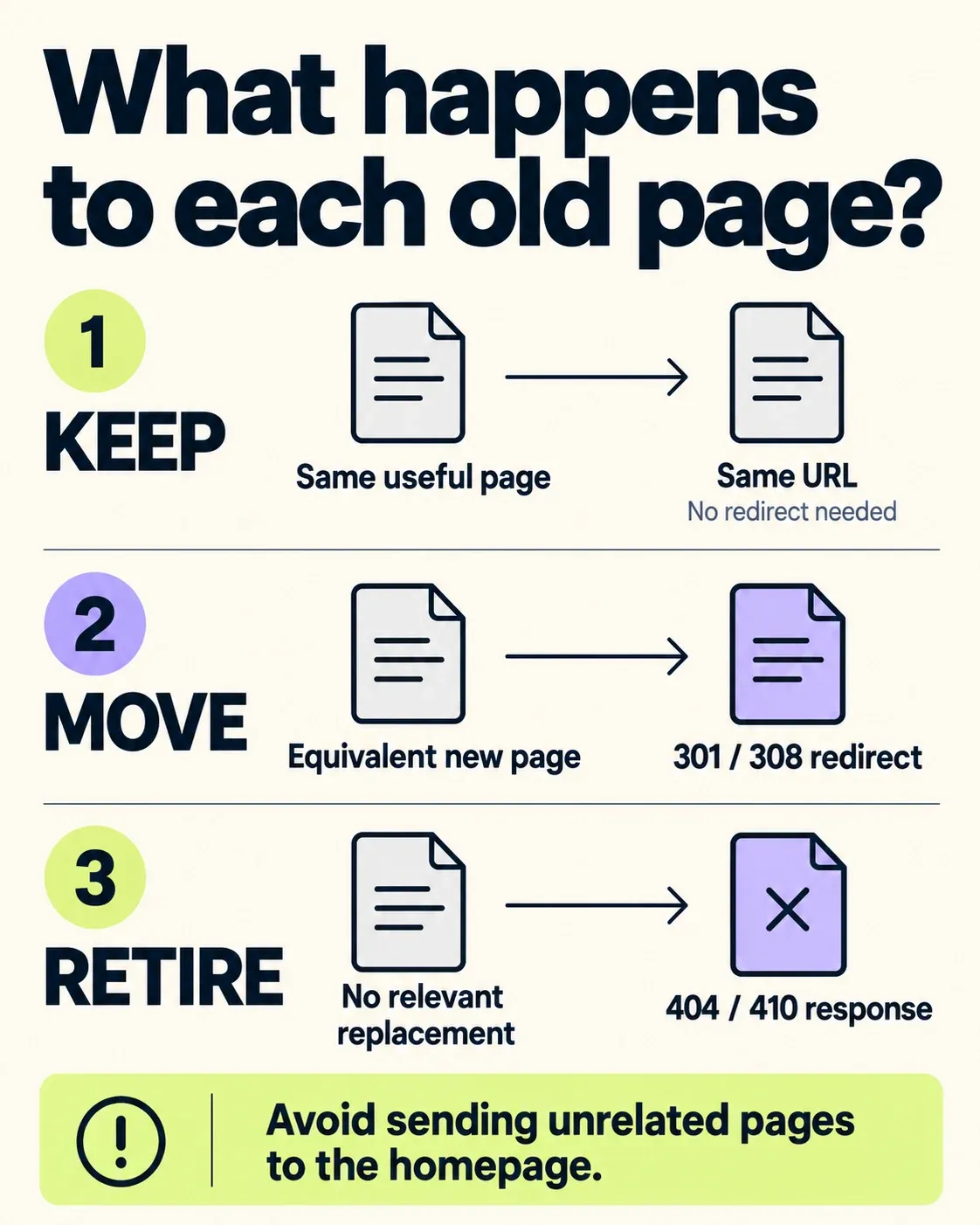
For a permanent URL move, use a permanent HTTP redirect such as a 301 or 308. Ask the developer to test that each changed address reaches the intended destination without loops or unnecessary intermediate stops. Choose a relevant replacement for each moved page.
For example, an old service page might move to a clearer service address. The test is whether the destination still answers the visitor’s original need. Sending every removed service, article and product to the homepage avoids that decision and can leave customers confused.
Google’s site-move guidance warns against irrelevant redirects and recommends keeping redirects for as long as possible, generally at least a year. Where content is removed without a replacement, a proper 404 or 410 response may be appropriate. Your specialist should document the choice.
Include important downloads and images in the handoff. Record existing redirect rules as well, so a new platform does not silently discard older routes that customers still use. Update internal links to the final addresses instead of making visitors pass through redirects unnecessarily.
Which Content and On-Page SEO Should the New Design Preserve?
Compare the old and proposed versions of priority pages side by side. Preserve the information that helps buyers understand the offer: services, locations, qualifications, relevant proof, limitations and the next step. Improve weak or outdated material deliberately rather than deleting it simply because a shorter layout looks cleaner.
Check that each page has a clear purpose within the site structure. A service page, project example and educational article should not become three nearly identical summaries after the content migration.
- Review the page title, main heading and supporting headings against the page’s purpose.
- Check meta descriptions for accurate summaries rather than leftover template text.
- Retain useful internal links and make important pages reachable through sensible navigation.
- Describe meaningful images with suitable alt text; do not replace useful written explanations with image-only text.
- Check business details, contact information and any structured data affected by the rebuild.
Google uses several sources when generating title links, including titles and prominent page text. A title entered into the CMS is not a promise of exactly what Google will display. Still, reviewing titles and headings helps your team catch mismatched services, duplicated templates and incomplete migrations.
If local SEO matters to the business, confirm the correct locations, service areas and contact destinations. A branch page should not lose its address or lead to the wrong office’s form. Redesigning your website is also a useful moment to remove obsolete claims, with the business owner approving factual changes.
What Technical SEO Checks Must Pass Before Launch?
Review the built website in a staging environment before the release. Ask for a crawl and a manual sample covering each important template, together with any known exceptions. Every page does not need an identical manual inspection, but the sample and its limits should be clear.
- Access: do intended public pages load successfully, and are the planned search crawler permissions correct?
- Indexing controls: which staging restrictions must be removed at launch, and which pages should intentionally stay out of search?
- Canonical URLs: do preferred-page references use the correct live addresses?
- Links and navigation: do menus, breadcrumbs and key internal links reach the intended pages?
- Migration: have the redirect map and important existing routes been tested?
- Content: are priority page information, images and downloads present in the built version?
Keep private staging content behind appropriate access controls. A robots.txt restriction is not a privacy measure. For intended public pages, Google must be able to access a page to read a noindex rule. Removing the wrong restriction, or leaving a development noindex setting on a service template, can defeat the launch plan.
Compare the preferred URL your team chose with the canonical tag on each duplicate or similar version. Look for staging-domain references and conflicting URLs across the live page, sitemap and internal links.
Ask for a comparison crawl of the existing site and the release candidate. Pick a difference on a priority page and ask the developer to show its destination, the reason for the change and the test result.
Does the Redesigned Website Work for a Customer on a Phone?
Start on a priority landing page and follow a real customer task: understand the service, check the evidence, find the price or next step, then contact the business. Test on actual devices where practical. A desktop screenshot cannot confirm that a mobile menu, form or booking widget works.
Google’s mobile-first indexing guidance calls for equivalent primary content on mobile and desktop. Check that the mobile design has not removed essential information or made it available only after an interaction that loads it from elsewhere.
Test the commercial handoff on the release candidate. Make a marked test booking or inquiry and have the receiving branch find it. A success message on the visitor’s phone can still accompany a request sent to the wrong branch.
Check page load times on important templates, including the mobile experience. Compare tests under similar conditions and distinguish a simulated test from real visitor data. Google explains that page experience and Core Web Vitals matter, while good scores do not guarantee top rankings. Performance work should improve the customer journey as well as a test result.
Make accessibility part of this review. The W3C forms tutorial gives your team specific checks for labels, instructions and feedback. Also check keyboard focus and readable text on the devices customers use.
What Belongs on the Launch Day Checklist?
Choose a release window with the right people available. Confirm a current backup, a documented recovery approach and who can make the decision to reverse a release. A rollback can affect new orders or inquiries, so recovery needs a business-aware plan.
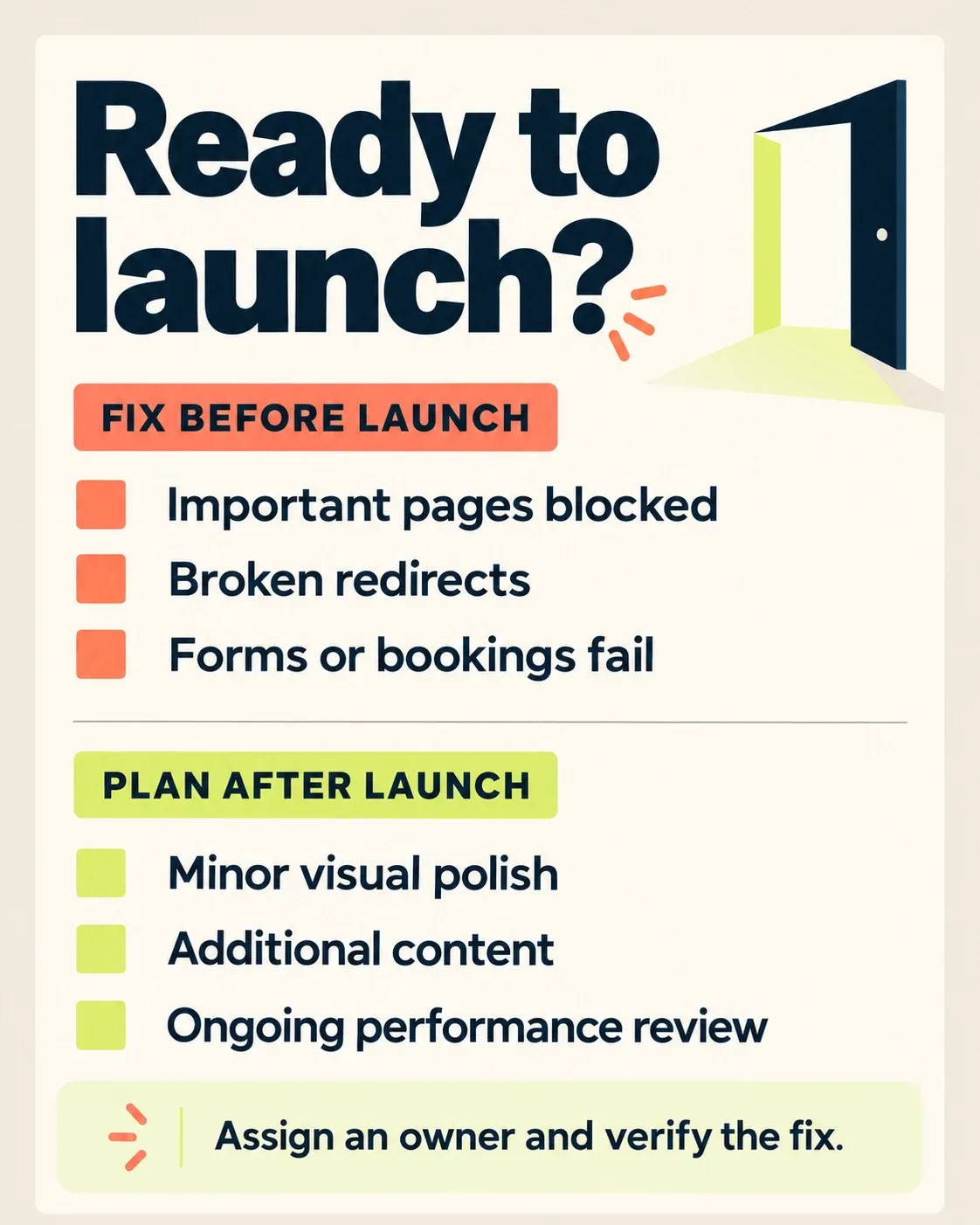
- Confirm the approved version is deployed to the intended live domain.
- Check priority pages, customer journeys and changed addresses on the live site.
- Remove development-only restrictions from pages intended for search.
- Verify live canonical references, navigation and important contact details.
- Check the XML sitemap contains the intended current URLs.
- Verify analytics and agreed customer actions, then record the launch time and remaining issues.
Check the XML sitemap protocol if you need to confirm which URLs or hosts belong in a sitemap. Keep the addresses consistent with the live site. Submitting a sitemap does not guarantee indexing. A domain move may also need separate Search Console steps.
For measurement, ask the person responsible to show an agreed action reaching the correct analytics property without duplicates. Use the guide to measuring calls, forms and leads to check that a real inquiry also reached the business.
How Do You Monitor SEO Performance After the Redesign?
Once the new website is live, review it against the baseline and mapping. Our suggested starting cadence is a launch-day check, frequent checks during the first week and a weekly review over the following month. Adjust the frequency for the size and risk of the change; this is a working process, not a Google recovery timetable.
Review important landing pages, search clicks and impressions, indexing changes, crawl errors, broken links and qualified customer outcomes. Compare equivalent page groups when addresses have changed. Look for a sudden problem affecting a template or journey before drawing conclusions from a site-wide total.
Google notes that significant site changes can bring temporary ranking fluctuations while pages are recrawled and reindexed. That does not make every decline normal. A broken form, blocked service page or failed redirect needs investigation promptly.
If visits appear stable but inquiries fall, examine the offer, contact process and measurement. If organic traffic falls across migrated pages, compare their destinations, access settings and preserved content. Search engine rankings alone cannot explain the whole outcome.
Keep a dated change log and name the person handling follow-up. A successful website redesign is easier to assess when completed work, tracking changes and commercial results can be reviewed together.
Who Should Own the Redesign Checklist and SEO Handoff?
Give one person responsibility for coordinating the website redesign process, with clear owners for content, development, search checks and measurement. A small team may combine roles; the responsibilities still need to be explicit.
Before approving a proposal, ask:
- Who inventories the current website and approves content removals?
- Who writes, implements and tests the URL mapping?
- Who checks the staging build and the live release?
- Who tests forms, bookings and analytics with the receiving team?
- What evidence is delivered at handover, and how long is follow-up included?
- Which fixes, licenses or additional reviews cost extra?
Bring in a reviewer before launch if nobody owns the redirect map or can verify which branch received a booking. Give that person the old URL, intended destination and a contact who can confirm the test.
At handover, pick one changed address from the map and one inquiry from the test log. Ask the person taking over the site to reproduce both checks. If they can find the evidence and know whom to call when a check fails, the handoff is usable.